Maple family app is shutting down: choosing what comes next
By Babs Team · · 11 min read

Maple has alerted users that their accounts will remain active until December 31, 2026, when the family app is set to shut down. If your household used Maple to know who was handling pickup, what needed signing, and what was for dinner, you now have a piece of the household to rebuild, probably by the same person who built it the first time. So if you fall into that camp, start by protecting the information your family still uses. Then choose a replacement for the part that kept your week moving.
Maple will shut down on December 31, 2026
On July 29, 2026, Wander welcomed Maple’s team into the company, a move Dealroom reported as an acquisition of Maple’s team. Maple’s current shutdown notice describes the move as an acquisition and says the family app will sunset on December 31, 2026.
That gives families a firm deadline and a few details that matter now:
- Maple accounts remain active until December 31, 2026. After that, they will close and become inaccessible.
- Maple says it will delete account data when the app shuts down. The notice says the data cannot be recovered afterward.
- Connections to Google Calendar, Apple Calendar, Outlook, and TeamSnap will also be deleted.
- Annual Maple subscriptions will no longer renew. Monthly subscriptions will remain active until December 31, 2026.
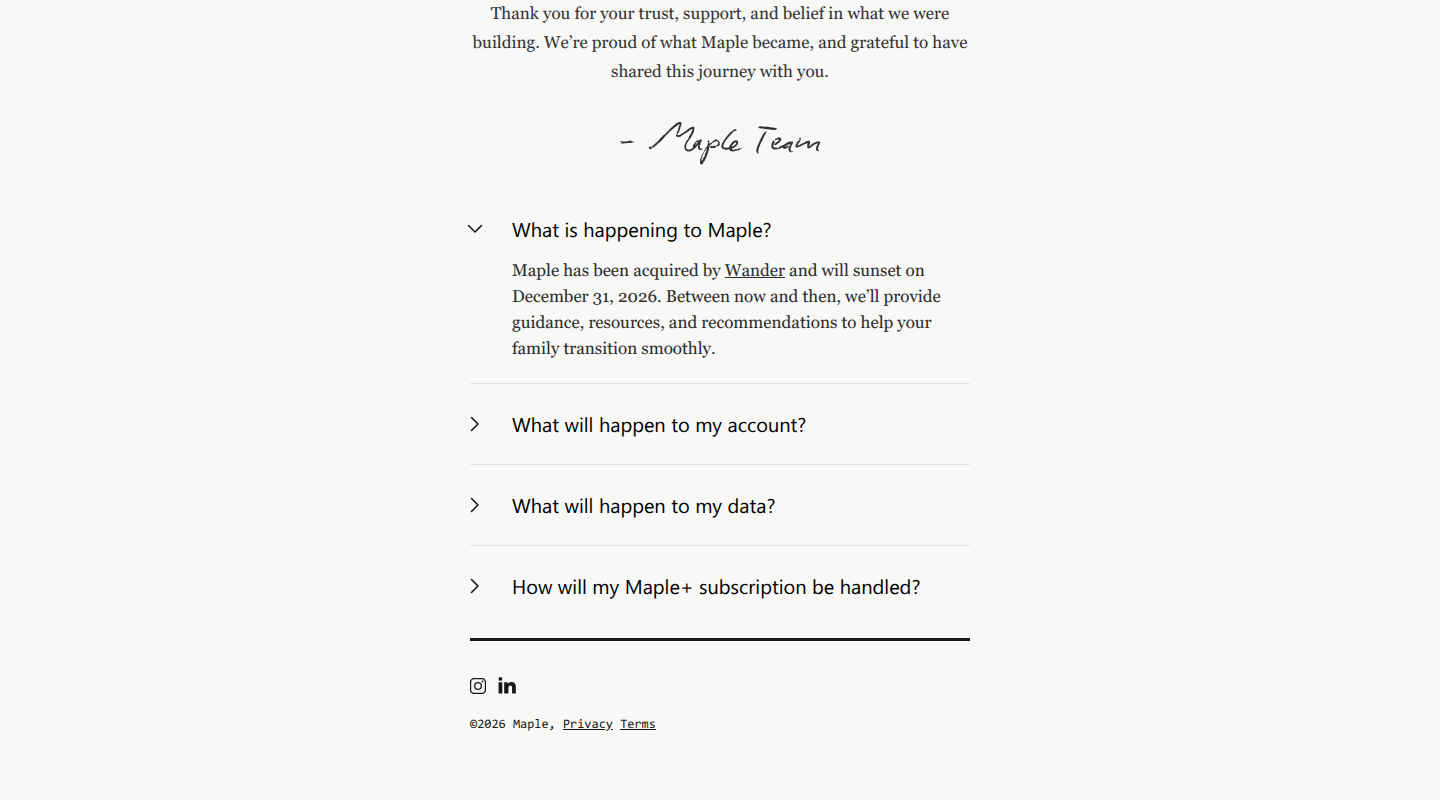
Maple’s shutdown notice. Source: Maple.
Maple says transition guidance, resources, and recommendations are coming. Its notice does not include a one-click migration process, any export formats, or guidance naming apps that can import Maple data directly.
The absence of that process is annoying, especially if you were the person who persuaded everyone to use Maple in the first place. There is still enough time to move carefully. Save what makes next week run before worrying about years of family history.
Protect your family’s Maple information first
Begin with where each item originally lived. For anything connected from Google Calendar, Apple Calendar, Outlook, or TeamSnap, check the original service first. A chore, recipe note, project, or event created only in Maple depends on Maple staying open.
That distinction keeps this move manageable. Locate outside-calendar events in their original service, then give Maple-only information your attention first.
| What you used in Maple | What to preserve | What to do now |
|---|---|---|
| Connected calendars | Source service, owning account, editable events, recurrence, time zones, reminders, notes, and attachments | Check the original service for the future schedule. If it offers an export, save a separate backup; Google and Apple instructions are linked below. |
| Maple-only events | Title, date, time, time zone, recurrence, location, notes, people, reminders, and attachments | Copy important future events into the calendar your family will keep using. |
| Tasks, chores, and lists | Open item, person responsible, due date, recurrence, reminder, notes, attachments, project, and completion state | Move open and recurring work first. Keep screenshots as a backup, and save editable text for the next app. |
| Meals, recipes, and groceries | Original recipe link, ingredients, method, family notes, planned meals, and current shopping list | Save recipes in editable form, along with the meals and groceries that affect the next few weeks. |
| Projects and documents | Folder names, files, links, notes, invited people, and privacy settings | Download files and record who could see each folder. Maple has not promised a transfer that preserves folder permissions. |
| Family access and connected services | Member email, role, current access, service name, owning account, and any calendar feed URL | Invite the same partner, co-parent, grandparent, nanny, or caregiver to the new setup while Maple is still available for comparison. |
Google provides calendar export instructions, and Apple Calendar on Mac has its own calendar export. These exports cover events stored in those calendars. They do not rescue Maple-only tasks, recipes, files, or events.
There is no prize for recreating a completed grocery list from 2023. Move future events, open to-dos, recurring responsibilities, active projects, and the recipes your family still cooks. Old records can follow once Tuesday is safe.
Choose a Maple replacement by the work your family shared there
A shared calendar only helps when the household can also see the work behind each event. The permission slip, sack lunch, and pickup plan can still live with one parent even when both adults can see Friday’s field trip. Pay attention to that gap when comparing replacements.
Maple gave families several ways to move that knowledge into view: calendars, email, tasks, meals, recipes, chat, projects, and documents. No replacement below recreates all of them exactly. Choose the app that takes over the family job your household would notice missing on Tuesday, then give the remaining records a sensible second home.
| Option | Best fit | Calendar and incoming information | Shared tasks and to-dos | What it does not replace |
|---|---|---|---|---|
| Babs with Google Calendar or Apple Calendar | Two-parent households that want less manual work getting school and activity details onto the family calendar | Google Calendar or Apple Calendar remains where the family’s schedule lives. Babs proactively finds possible events and to-dos the calendar is missing in connected Gmail, then presents them for parent review before accepted events are added. | Each parent has a separate login and can see event suggestions, to-dos, and the family’s Lineup | Maple’s meals, recipes, chat, documents, and project folders; Babs currently requires iOS and Gmail |
| Cozi | Families that want calendar, lists, recipes, groceries, and meals in one organizer | Shared color-coded calendar; compatible outside calendars can appear through read-only feeds | Shared to-do and shopping lists | A published bulk Maple import; outside calendar feeds remain read-only |
| FamilyWall | Families that want a broad shared hub with lists and communication | Shared calendar, with some outside-calendar connections depending on plan | Shared to-do and shopping lists | A complete Maple import; documents, meal planning, and some connections require Premium |
| TimeTree | Families that want several shared calendars and discussion around events | Multiple shared calendars with comments and images; outside-calendar sharing can require copied events | Lighter task support than a full family organizer | Maple’s meal planning, recipes, deeper task system, and document storage |
| Google Calendar or Apple Calendar | Families that mainly used Maple to view an outside calendar | Keeps the editable calendar with the account that already owns it | Google Tasks or Apple Reminders can sit alongside dated events, with separate sharing rules | Family email review, meal planning, recipes, documents, and an all-in-one family view |
Babs with Google or Apple Calendar: for shared visibility for the whole household
Google Calendar or Apple Calendar remains where the family’s schedule lives. Babs is the proactive family operating system for modern households. It finds the school and activity events and to-dos the calendar is missing and reduces the manual work of adding them.
A parent connects their Gmail or a shared family Gmail account, then Babs scans messages for relevant events and to-dos related to their children’s schools and activities. Parents confirm context about their children, schools, and activities, which helps Babs learn what matters to the household.
Parents review the events and to-dos Babs finds and decide what to add. Babs does not add an event to the family’s Google Calendar or Apple Calendar without parent approval. When a later email says practice has moved from 5 p.m. to 6 p.m., Babs flags the new time for review. A parent approves the change before the calendar is updated.
Babs is built for the household. Each parent gets a separate login and can see event suggestions, to-dos, and their family’s Lineup. The Lineup previews the week ahead and helps the household know who needs to be where and when. Both parents can see what is coming without one person having to write a separate recap.
This setup fits families that want their schedule to stay in Google Calendar or Apple Calendar while Babs handles the part of Maple that turned incoming school and activity emails into family events and related to-dos. Babs does not provide a one-click Maple migration or replace Maple’s meals, recipes, chat, documents, or project folders. Babs is currently available through a waitlist on iOS. A household that needs Android, web access, Outlook, Apple Mail, broad access for other caregivers, or a complete Maple-style hub needs another fit today.
Cozi: when Maple was the family’s broad organizer
Cozi’s family organizer FAQ covers the familiar shape: a color-coded shared calendar, shared to-do and shopping lists, recipes, groceries, and meal planning. It suits a household that wants Saturday’s schedule, the grocery list, and dinner in the same app.
Compatible outside calendars appear in Cozi through read-only URL feeds, so the original event remains in Google, Apple, Outlook, or another source. Cozi Max can create calendar events from an email, PDF, or photo sent to a unique address on mobile. That is an item-by-item intake route. Maple and Cozi have not published a bulk transfer for Maple-only events, tasks, recipes, or folders.
FamilyWall: when messages and documents belong beside the schedule
FamilyWall’s free plan combines a shared calendar, shopping and to-do lists, family messaging, a gallery, and contacts. FamilyWall Premium adds documents, meal planning, budgets, more location features, and Google and Outlook calendar connections.
That breadth makes FamilyWall a closer match for families who treated Maple as a shared family space as well as a calendar. The plan boundary matters when documents, meals, or connected calendars are the reason for moving. FamilyWall does not publish a Maple import that preserves every task field, file, folder rule, and permission.
TimeTree: when separate groups need their own calendars
TimeTree shared calendars give a family separate spaces for the household, a school group, a team, and extended family. Members can attach comments and images to events, giving each group a place to see and discuss plans.
Its outside calendars need care during a move. One person can display an outside calendar privately in the mobile app, but the rest of the TimeTree calendar members do not see that private view. Sharing those events requires importing copies into a shared calendar. Later changes in the original calendar do not update the copied events, and another import can create duplicates. TimeTree’s outside-calendar guide explains both routes. Families that used Maple for meals, recipes, detailed tasks, or documents will need another home for those records.
Google Calendar or Apple Calendar: when Maple mainly displayed the schedule
If most Maple events already belong to Google Calendar or Apple Calendar, keeping that calendar as the editable source is the least disruptive route. Account ownership, recurring events, and the editing rules your family already understands can stay in place.
The rest of the Maple setup will split across other apps. A dated Google Task can appear in Google Calendar, while a scheduled Apple Reminder can appear in Apple Calendar. The task records still live in Google Tasks and Apple Reminders. Google’s shared tasks begin in a Google Chat space or, for eligible Workspace plans, in Google Docs, and shared tasks cannot repeat. Apple task assignment requires a shared iCloud Reminders list.
This route suits families that want a lean calendar and are comfortable putting email review, lists, meals, recipes, and files elsewhere. The Babs family calendar app guide goes deeper on the calendar choices.
Give Maple’s tasks and to-dos a deliberate new home
A calendar event answers when. Maple’s tasks often carried the rest of the handoff: return the permission slip, pack a sack lunch, buy poster board, or decide who is covering pickup. Moving the dates while leaving that work behind creates a calendar that looks finished and a week that is not.
Babs fits this part of the replacement decision when the to-do starts in a Gmail message from school or an activity. Google Calendar or Apple Calendar remains where the family’s schedule lives, while Babs proactively finds the events and related to-dos the calendar is missing and reduces the work of adding them by hand. A parent decides what to add. Each parent has a separate login and can see event suggestions, to-dos, and the family’s Lineup. Accepted to-dos can be organized by child and deadline, with reminders for follow-through. A family that needs visible assignee controls or recurring chores entered by hand is better served by a tool built around manual household lists.
Cozi is the broader choice when shared to-do and shopping lists need to live beside recipes, groceries, meals, and the calendar. FamilyWall makes more sense when those lists also sit beside family messages and documents. Google Tasks and Apple Reminders keep the setup close to the calendar you already own, though their sharing rules are narrower than a family organizer. TimeTree works best when the work is mostly conversation around events rather than a deep household task system.
The Babs family to-do list app guide covers more dedicated task options. For a Maple move, the useful question is where another person can see the action and its context without coming back to the same parent for an explanation.
Move next week before you move the archive
Once you have chosen the new setup, bring across the next two weeks of events and open to-dos. Invite the other people who need access while everyone can still compare the new view with Maple. Then move recurring work, favorite recipes, and active documents.
Before leaving Maple, have the other parent or caregiver find next Tuesday’s plans and the work attached to them in the new setup. That small handoff catches missing access, copied events that will go stale, and to-dos that never made the move. Everything your family still needs from Maple must be out before the app closes on December 31, 2026.
Related articles
Family life · Babs
Minor passport checklist for U.S. children under 16
Prepare for your child's U.S. passport appointment with the required documents, copies, photo and fees, plus the separate route for ages 16–17.
Family life · Babs
Babysitter interview questions for the after-school hours
Ask about the after-school job your family actually needs, with practical follow-ups, fictional candidate replies and separate reference questions.