TimeTree vs Cozi: Which family calendar fits your household?
By Babs Team · · 10 min read

If you're comparing TimeTree and Cozi, the decision starts with how your family wants to share a clear schedule without relying on one parent to relay every change. Both apps share dates across a household, yet they ask families to organize those dates in very different ways. The useful question is who needs to see what, whether lists belong beside the calendar, and how school or activity updates reach the family.
Why parents choose between TimeTree and Cozi
TimeTree's basic calendar features are free, with mobile apps and a web version. Cozi Free also includes a shared calendar, and Cozi works on iPhone, Android, and the web. If you're weighing the two apps, they look similar at first, even though they feel quite different in daily use.
TimeTree is built around separate calendars. A family can have one calendar for everyone at home, another shared only with a co-parent, and another for the adults handling an activity or pickup. Each calendar has its own members and its own event comments.
Cozi is one shared place for the family calendar and lists. Cozi Free includes the calendar, grocery and to-do lists, and recipes. The household opens the same account to see that information. Family members can filter the calendar to one person's schedule, but the information still belongs to the same household account.
For most plans, these apps start helping after a date is entered or connected from another calendar. Cozi Max adds another option: a parent can forward an email, PDF, or photo of a flyer and have Cozi make an event from it. Babs handles Gmail differently. Babs connects to Gmail, finds possible family events and to-dos across the inbox without waiting for each message to be forwarded, and puts them in front of a parent to review. An approved event goes to Google Calendar or Apple Calendar in one tap. TimeTree or Cozi can then show that Google or Apple calendar, with the limits explained below. Babs complements the calendar your family chooses rather than asking you to replace it.
TimeTree vs Cozi: the short answer
Choose TimeTree when your family needs different calendars for different groups of people. It also suits families who want comments and photos attached to an event, such as a pickup reply or a photo of the field map.
Choose Cozi when the people at home want the calendar and shared lists in one app. It is also easier when a school, team, or other group publishes a calendar that should keep showing updates inside the family app.
| If this sounds like your family | Better fit |
|---|---|
| A caregiver should see some events without seeing the whole family schedule | TimeTree |
| Pickup notes and photos should stay with the event | TimeTree |
| Everyone at home wants the calendar, groceries, and to-dos together | Cozi |
| School or team calendar changes should appear without copying the event again | Cozi |
| Two adults want ad-free access under one family payment | Cozi |
| Separate groups need their own shared calendars | TimeTree |
TimeTree makes sense when each group needs its own calendar
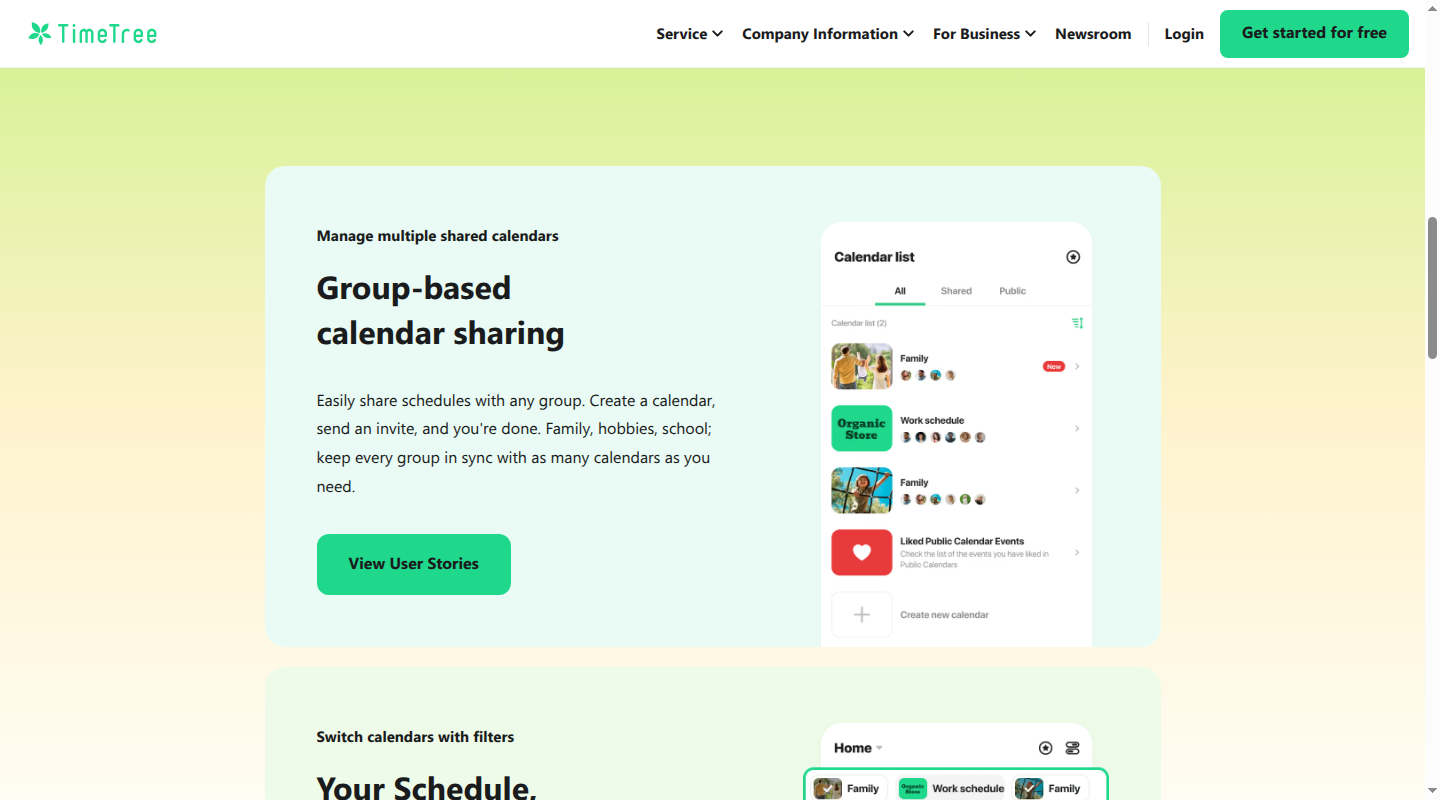
TimeTree treats each shared calendar as a separate room. Joining one room does not open the others. That is useful when the people involved in Saturday soccer are different from the people who need the full household schedule.
A parent could share the main family calendar with a partner, keep a separate calendar with a co-parent, and invite a grandparent or sitter only to the calendar for the dates they cover. Adults and older children who need to open the app can use their own TimeTree accounts. Younger children can appear as account-free virtual members, so an event can still be assigned to them without giving them a login.
TimeTree also has a web version, though outside Google or Apple calendars can be shown or copied only in the phone app.
Event comments keep the pickup conversation with the plan
TimeTree members can reply underneath an event and add photos. It feels like a small family text thread that belongs to one date.
That is handy for details that otherwise get buried in messages. A parent can add the field map to Saturday's game. The person doing pickup can reply that they have it covered. If the entrance changes, the new note stays under the game instead of sitting in a separate group chat with no date attached.
TimeTree's memos can hold a simple checklist, shopping list, or plan that does not have a date yet. A memo can later become an event. This works for an occasional packing list. Families that want grocery and to-do lists beside the calendar every day will find Cozi more natural.
TimeTree handles Google and Apple calendars in two different ways
TimeTree lets a parent show another phone calendar on the Home Calendar. That version keeps updating when Google Calendar or Apple Calendar changes, but only the person who connected it sees it in TimeTree. It is a personal view, even when a shared TimeTree calendar is also open.
The other option is to copy events from Google or Apple into a shared TimeTree calendar. Everyone in that TimeTree calendar can see the copied events. The copy stops following the original.
In everyday terms, if a team moves practice from 5:00 to 5:30 in its Google Calendar, the updated time appears for the parent who is showing that Google Calendar on the TimeTree Home Calendar. If the 5:00 practice was copied into the shared TimeTree calendar, it stays at 5:00 until someone fixes the copy. Copying it again can also create a duplicate.
The same rule applies to events that Babs sends to Google Calendar or Apple Calendar. One parent can show that calendar in TimeTree and see new approved events there. Sharing those events with the members of a TimeTree calendar still takes a copy.
TimeTree pricing
TimeTree's main calendar features are free and include ads. TimeTree Premium costs $4.49 a month or $44.99 a year in the US. It removes ads and adds file attachments, a view that lays events out by time, pinned events, and dedicated support.
Premium belongs to one person's account. TimeTree has no family subscription, so two adults who both want Premium pay separately. A free member can still see and download a file that a Premium member attaches to a shared event.
Cozi makes sense when the household wants the calendar and lists together
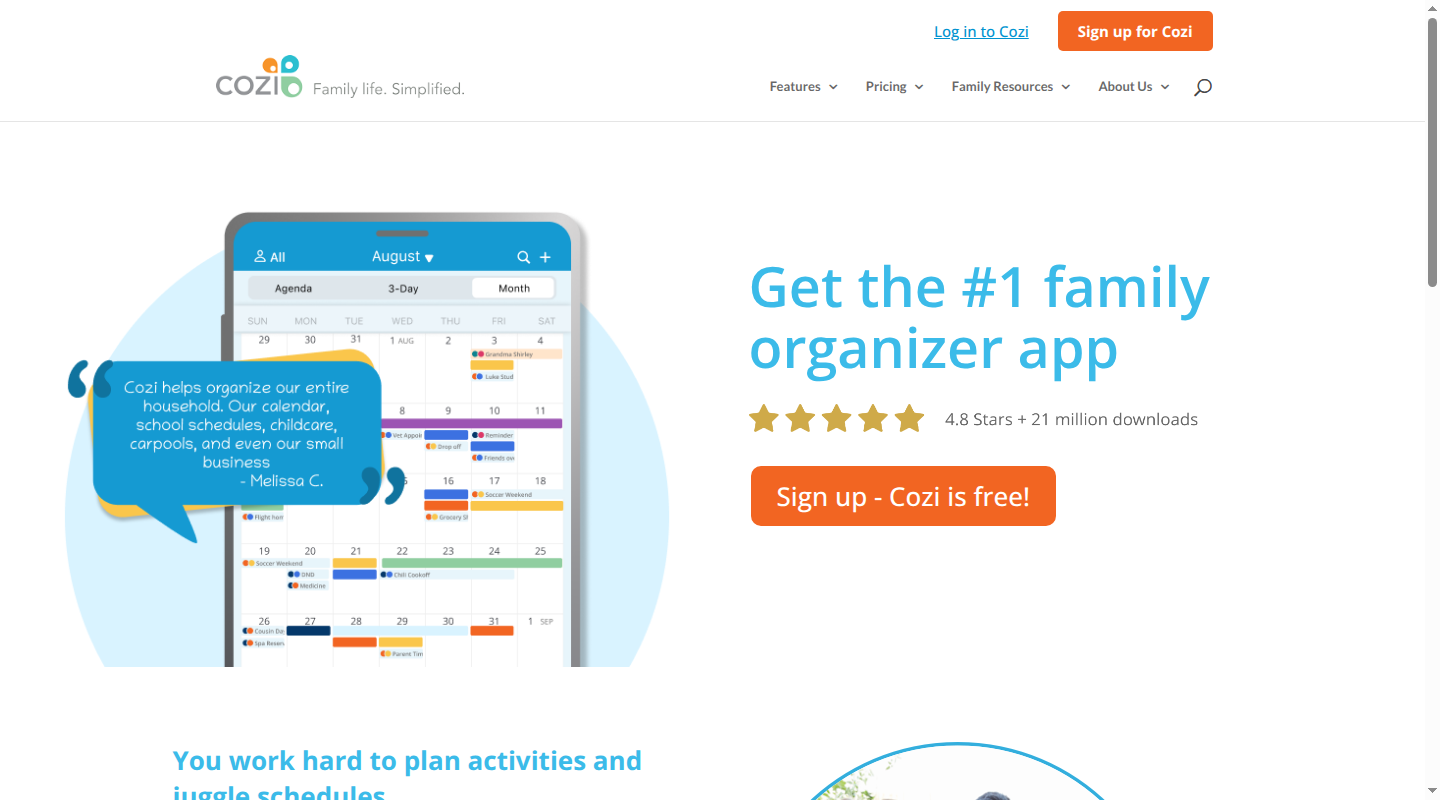
Cozi gives a family one shared account for up to 12 people. Each person who signs in can use their own email address, while the family shares one password. Everyone in the account can see, add, change, or delete the household's information.
That setup is easy to understand at home. One parent moves the orthodontist appointment and the new time is on the family calendar. Someone adds milk to the shopping list and the list is current for the person at the store. A child can be assigned a color, and the calendar can show the whole family or just that child's events.
The trade-off appears when someone outside the household needs access. Cozi does not have a limited guest role. Adding a sitter or grandparent as a signed-in member gives that person the same access to the calendar and lists as everyone else. TimeTree is a cleaner fit when an occasional caregiver should see only the events that involve them.
Cozi keeps everyday lists in the same shared place
Cozi Free includes shopping lists, family to-do lists, and a recipe box alongside the shared calendar. A household can keep separate lists for groceries, school supplies, or camp packing. Ingredients from a saved recipe can also go onto a shopping list.
This is the clearest reason to choose Cozi. A parent checking tomorrow's schedule can also add something to the grocery list or tick off a form that needs to go back to school. The rest of the household sees the current calendar and the current list without opening another app.
Cozi can keep showing changes from a school or team calendar
Cozi can subscribe to a calendar link from Google Calendar, Apple Calendar, Outlook, a school, or an activity provider. The link is read-only, which simply means the family can see those events in Cozi but changes them where they started.
If a swim club changes Saturday's warm-up time on its own calendar, Cozi pulls in the new time. Cozi says updates appear in about an hour, or the next time after an hour that someone opens and refreshes the family calendar. No one has to copy the event into Cozi again.
Cozi can send its own calendar out through a similar read-only link. An event changed in Cozi can then appear in Google, Apple, or Outlook, although the receiving calendar decides when to refresh it. Google Calendar can take up to 48 hours to show a change from a Cozi link, so that route is less useful for a late change to today's pickup.
For Babs events, a family can let Babs add approved dates to Google Calendar or Apple Calendar, then subscribe to that calendar in Cozi. The events will appear in Cozi after the feed refreshes, while Google or Apple remains the place to edit them. The Cozi and Google Calendar comparison explains that setup in more detail.
Cozi pricing
Cozi Free includes the shared calendar, shopping lists, to-dos, and recipes, with ads. One important limit is how far ahead a free user can add an event: Agenda view allows new events only within the next 30 days. Families that add the school term, summer camp, or appointments months ahead will notice that limit.
Cozi Gold costs $39 a year for the whole family. It removes ads and adds events farther into the future, mobile month view, calendar search, change notifications, and up to three reminders for each person on an event. One Gold payment covers everyone in the account.
Cozi Max costs about $79 a year and includes Gold. Cozi's plan table lists $79 a year, while its Max page lists $79.99. AI Event Import can turn an email, PDF, or photo of a flyer into a Cozi event. A parent finds a personal Cozi email address in the app and forwards each item to it. Cozi then creates the event in the shared calendar.
That direct Cozi handoff may be useful for a family that wants every event to live in Cozi. Babs takes a different approach: Babs finds possible dates across connected Gmail without waiting for each message to be forwarded, then a parent reviews them before approved events go to Google Calendar or Apple Calendar. Cozi can show those approved dates through the calendar link described above.
Which app fits your family?
Choose TimeTree if the main question is, "Who should be allowed into this calendar?" Separate calendars give a co-parent, caregiver, or activity group access to the plans they need. Event comments are also useful when the family wants pickup replies, maps, and small changes attached to the date.
Choose Cozi if the main question is, "Can the whole household keep the calendar and lists in one place?" Its shared account makes the grocery list, to-dos, recipes, and everyone's schedule part of the same family organizer. Its calendar links are also better for school or activity schedules that keep changing at the source.
Price matters more when two adults want the paid features. TimeTree Premium is bought per person, while Cozi Gold covers the household. Families can use either free plan, though Cozi Free's 30-day event-entry limit matters for planning ahead.
If neither setup is quite right, the family calendar comparison and guide to apps like Cozi cover more options.
Can TimeTree and Cozi sync with each other?
Cozi follows outside calendars through a read-only feed, while TimeTree says its events cannot be exported or reflected automatically in outside calendars. That leaves no direct automatic TimeTree-to-Cozi sync. A family using both would need to copy events, or keep Google Calendar or Apple Calendar as the main calendar and let each app show it in the ways described above.
If family dates and to-dos are still sitting in Gmail, join the Babs waitlist. Babs is free and in private beta, available on iOS, and works with Gmail.
Related articles
Family organization · Babs
A family meal planning app everyone can use
Compare AnyList, Plan to Eat and Cozi for shared meal plans, recipe imports, grocery handoffs, devices, household pricing and provider-described data practices.

Family organization · Babs
Best carpool app for parents: apps and shared sign-ups
Compare GoKid, Carpool Kids, Carpoolio and CarpoolConnect with Google Sheets and Forms, including driver slots, calendar sync, access and costs.